
real estate · instant
Empty room in, staged listing photo out.
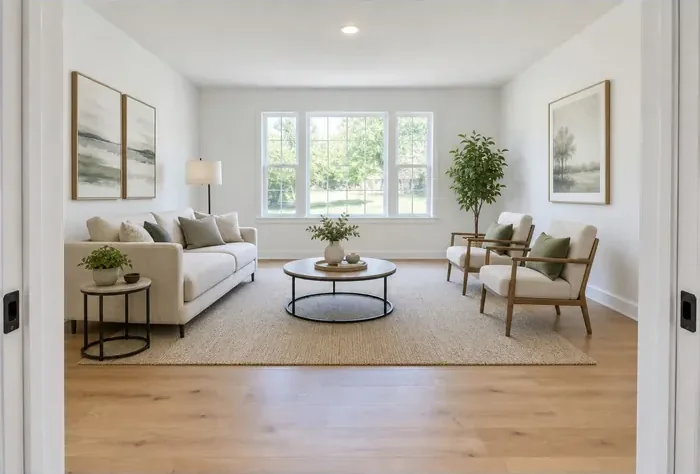 AfterReal result · not retouched
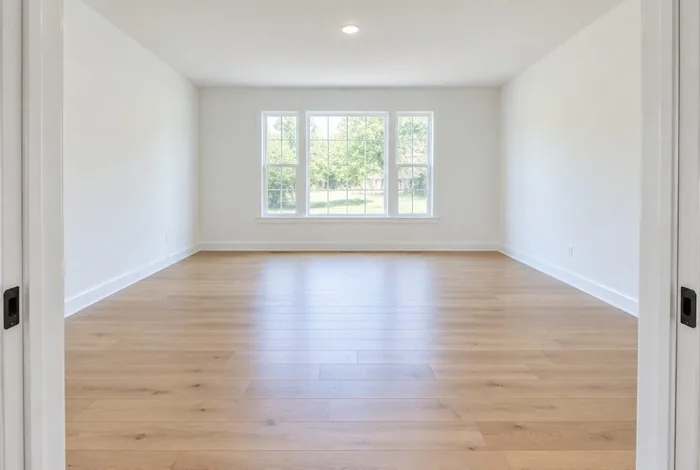 Before
Upload photos of the empty rooms, pick a style, and get two photorealistic staged versions of each exact photo — same walls, same windows, same light — in about two minutes per photo.
- You send
- Photos of the empty rooms, up to 10 (JPG/PNG/WebP, up to 8 MB each)
- You get
- 2 photorealistic staged versions of each photo (JPG, MLS-ready)
- Time
- About 2 minutes per photo
Staging services with human editors charge about $23–37 per photo and take 24–48 hours
Example result
What you get — before you pay
Real result for a sample photo of an empty living room. The staged photo is exactly what our pipeline returned — not retouched. Your order runs the same pipeline on your photo.
- 1 photo of the empty living room — three windows, oak floor, recessed ceiling light
- Room: living room · Style: modern
- Notes: keep the windows and the floor visible, no TV on the wall
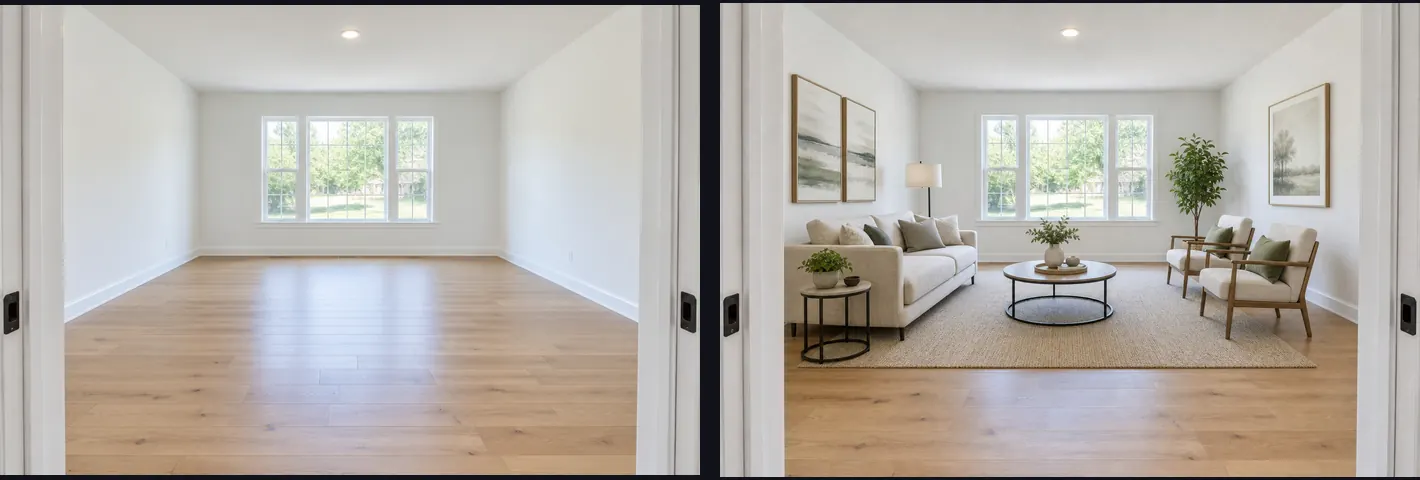
Staged version 1 — modern living room (JPG, 1536×1040)
A cream sofa with a side table, a round coffee table on a jute rug, two wood-frame armchairs, a floor lamp, an olive tree and three framed prints were added. The recessed ceiling light, walls, floor, windows, doors and the camera position are exactly as photographed, and the photo keeps its proportions.
Staged version 2 — modern living room (JPG, 1536×1040)
The same room with a second furniture layout — different coffee table, lamps and plant placement — so you can pick the version that reads best as the listing's hero photo.
Disclosure pack (California AB 723 / MLS)
Each version again with a small “Virtually staged” label in the corner, a public page with the unaltered original photo plus a QR code for flyers, and the line to paste next to the photo: “Virtually staged (digitally altered image). Original photo: orvionis.com/original/…”.
Staging details (JSON)
Room type, style, your notes and the exact instructions sent to the image model — kept with the order so a redo starts from the same brief.
Label it “virtually staged” in the MLS — most boards require it. If anything structural changes in your result, one redo is included.
Six styles
One room, six styles
Not sure which style fits your listing? Here is the same empty living room, staged by ORVIONIS in each of the six styles you can order.
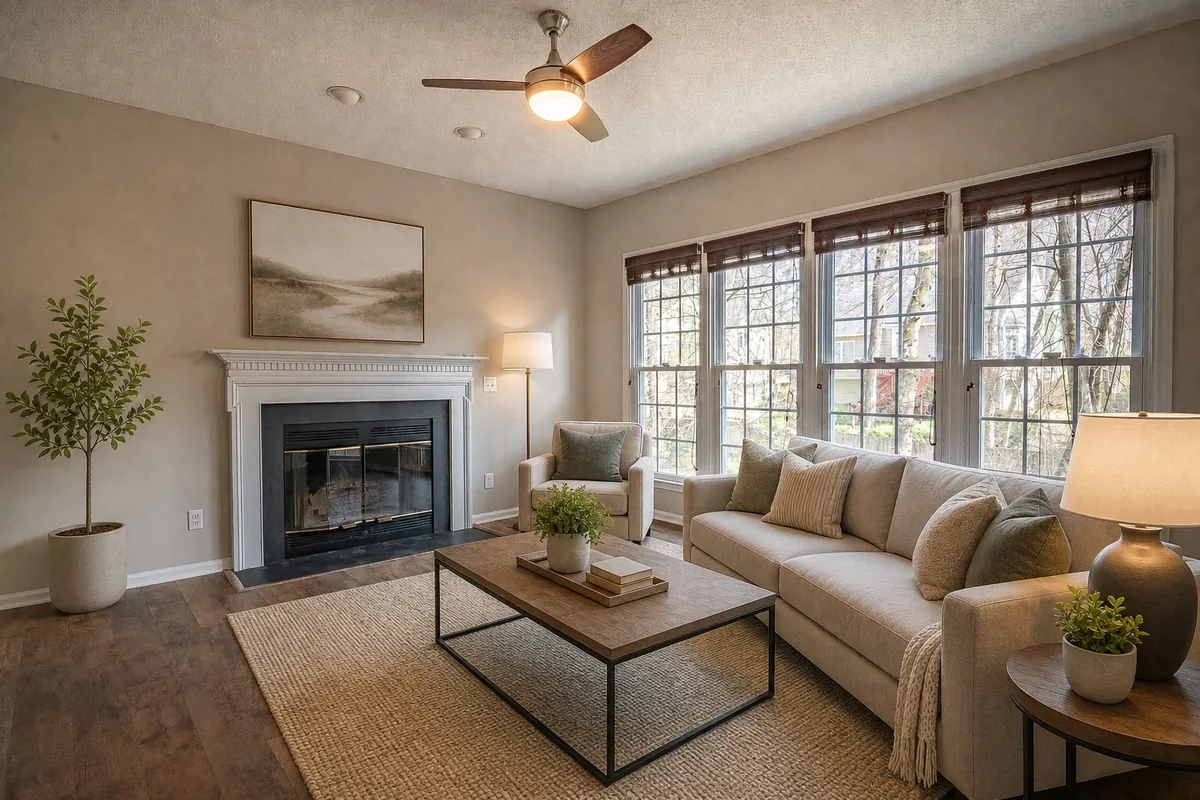 Modern · virtually staged
Real results, not retouched: a free stock photo of an empty room (Curtis Adams, Pexels) run through ORVIONIS once per style — the same pipeline as your order. Each run returns two versions; one is shown here, resized. The walls, windows, fireplace and ceiling fan stay as photographed.
How to pick a style for your listing →What you get
- 2 staged versions of each photo, 1024 px or larger, JPG ready for the MLS
- Up to 10 rooms in one order: $15 a room, or $49 for the whole listing (up to 5 rooms + the MLS description), $99 for 10 — pick the room type of each
- The architecture stays untouched: walls, floors, windows, fixtures, perspective
- 6 styles: modern, scandinavian, farmhouse, mid-century, luxury, coastal
- Before/after side by side on your order page, downloads kept 90 days
- Disclosure pack for California AB 723 and MLS rules: labeled copies, a public link and QR code to the original photo, and the line to paste next to it
How it works
Up to 10 well-lit photos of empty rooms, up to 8 MB each. Pick the room type of each photo and one style.
Your first photo is free once you confirm your email. After that, $15 a room, or $49 for up to 5 rooms with the MLS description, via secure Stripe checkout; staging starts immediately.
About two minutes per photo later: two staged variations of every room on your order page and by email.
Questions
- Does it change the room itself?
- No. Furniture, rugs, lighting and decor are added; walls, floors, windows, doors and the camera angle are kept as photographed. If something structural did change, reply to the delivery email and we redo it.
- Do I have to disclose virtual staging?
- Almost everywhere, yes. In California, AB 723 (in force since January 1, 2026) requires digitally altered listing photos to carry a disclosure next to the image and the unaltered original to be available — on your own site, or through a public link or QR code elsewhere. MLS rules differ by board: Stellar MLS in Florida, for example, wants “Virtually staged” in each staged photo's description, the virtually staged box ticked and the public remarks to start with “One or more photo(s) was virtually staged.”, and it allows no words on the photo itself. ARMLS in Arizona instead requires its own Flexmls “Digitally Altered” watermark on each altered photo, with the original directly before or after it. In Texas, HAR (Houston) and SABOR (San Antonio) want the photo marked as virtually staged in its photo description. Every order includes a disclosure pack: the unlabeled versions for the MLS, labeled copies for ads and social, a public page with the original photo plus a QR code, and the line to paste. It helps you comply; you remain responsible for your listing.
- What photos work best?
- Straight-on or slight angle, daylight, the whole room in frame, nothing blocking the floor. Cluttered rooms get staged too, but empty rooms give the cleanest result. The order form checks each photo as you add it and says so before you pay if it looks small, dark or blurry.
- Does it work for kitchens, bathrooms and patios?
- Yes — pick the room type for each photo. Kitchens get stools or a small table and a little counter decor, while the cabinets, appliances and ceiling lights stay as they are. Bathrooms get accessories only: towels, a mat, a tray and a plant. Patios and porches get outdoor furniture. Real before/after results for five rooms are in the guide linked below.
- Can I see it on my photo before paying?
- Yes, two ways. Your first photo is free: upload one photo, leave your email and click the link we send — you get the full result, two versions without watermarks. Or press “See a free preview” for one watermarked, downsized version of your (first) photo in about a minute (a few per day).
- Is the first photo really free?
- Yes: one photo per person, no card. It is the same order a customer pays $15 for — two full-resolution versions and the disclosure pack — and it starts when you click the link in the email we send, so we know the address is yours. There is a daily limit; when it is reached, the form says so, and the free watermarked preview still works.
- Can I stage several rooms, or get another style?
- Up to 10 rooms fit in one order: $15 a room, or the Listing Pack — up to 5 rooms plus the MLS listing description — for $49, and $10 for each room after that ($99 for 10). Each photo gets two versions in the style you pick and its own room type. For a second style of the same rooms, place another order.
- What is the MLS description in the Listing Pack?
- Orders of 4 or more rooms include our Listing Description ($9 on its own). After delivery you get a link: enter the listing facts (address, price, beds, baths, features) and you receive an MLS-ready description, a short version and social captions, checked for fair-housing wording. On 1–3 rooms you can add it for $7 at checkout.
- I stage every week. Is there a bulk price?
- Yes: Pro credits, 25 rooms for $149 (about $5.96 a room), paid once and valid for 12 months, for photographers, teams and anyone who stages often. Sign in with the email you bought them with and this form stages your photos from the balance, with no checkout. The staged photos carry no ORVIONIS mark.
- Is this AI virtual staging?
- Yes. An AI image model adds the furniture and decor to your own photo, instructed to keep the walls, floors, windows and camera angle as they are. That is why it takes minutes instead of the 8–48 hours human editing services quote, and costs $15 instead of their $24–$30 per photo (prices in our cost guide). If the room's structure changed anyway, or a version is unusable, one redo is included.